Static vs Dynamic Websites vs Web Apps: Costs, SEO & AI
Not every business needs a complex website. Discover the differences between static websites, dynamic websites and web applications, with familiar examples, development costs in Uganda, practical tools that can attract organic traffic, and the impact of AI on web development.

Understanding website types, real-world examples, development costs, organic traffic strategies and how interactive tools can turn an ordinary business website into a valuable digital resource.
Imagine two businesses operating in Kampala. Both have websites, both provide their contact details, and both want to attract potential customers through Google.
The first website describes the company's services, displays photographs and encourages visitors to request a quotation. The second does all that, but also provides a free calculator that helps prospective customers estimate the cost of a service before making an inquiry.
Which business is giving visitors more reasons to engage?
The answer depends on what those visitors need, but the second business has introduced an important possibility: its website can provide value before a commercial relationship even begins.
This distinction is becoming increasingly relevant as organizations invest in websites, digital platforms and web applications. A website is no longer limited to displaying information. Depending on its design, it can educate customers, calculate costs, support purchasing decisions, manage transactions or coordinate entire business operations.
Yet many organizations begin their digital journey with the same request: "We need a website."
Before committing to development, it is worth understanding what that means, what different technologies can accomplish, what they cost and whether the investment will address a genuine business need.
1. What Is a Website?
A website is a collection of related web pages and digital resources accessible through a web browser, generally under a common domain name.
When someone enters a website address, the browser retrieves the information needed to display the page. This can include text, images, videos, interactive elements and information obtained from remote services.
Most websites rely on three foundational technologies: HTML for structuring content, CSS for controlling appearance and JavaScript for interactivity. More sophisticated platforms may also use databases, backend services, APIs and content management systems.
However, not every website requires a database or a complex backend.
A small business might need only a homepage, services, portfolio and contact page. A media organization may require a publishing system supporting thousands of articles. A financial services provider may operate a platform where authenticated customers manage accounts and transactions.
All three are accessible through web browsers, but their purposes and technical requirements are very different.
The important question is therefore not simply whether your organization needs a website. It is what you expect that website to accomplish.
2. What Is a Static Website?
A static website serves prebuilt pages to visitors. Its content does not ordinarily need to be assembled separately by a server for every request.
Consider a photographer who wants to display a portfolio, explain available services and provide contact information. If the content changes only occasionally, a static website may be sufficient.
Common examples include personal portfolios, company profile websites, digital brochures, event landing pages and small business websites.
Why choose a static website?
Static websites are generally simpler to develop, can be inexpensive to host and often perform well because pages can be delivered directly from hosting infrastructure or a content delivery network.
Their simplicity can also reduce certain security and maintenance requirements because they may not need a continuously running application server or database.
However, a static website does not necessarily mean a website without interactivity.
JavaScript can power image galleries, animations, pricing calculators, interactive forms and other tools directly within the visitor's browser. A static site can also communicate with external services when necessary.
This distinction matters because businesses sometimes assume that introducing a calculator or another interactive feature automatically requires a sophisticated web application.
It does not.
For relatively simple calculations that do not require accounts or stored records, browser-based functionality may provide the required experience without significant backend infrastructure.
When should you choose a static website?
A static website is a reasonable starting point when your objective is to establish credibility, showcase services, share information, present previous work and give customers a reliable way to contact you.
3. What Is a Dynamic Website?
A dynamic website can generate, retrieve or update content based on databases, application logic, external services or user interactions.
A useful example is a news publication.
Imagine an organization publishing twenty articles every day. Creating and maintaining each article as a separate hand-coded webpage would become increasingly difficult.
Instead, the organization can use a content management system (CMS) to allow editors to write, review, publish and update articles through an administration interface.
Popular examples of dynamic websites
Wikipedia allows contributors to create and update encyclopedia articles, with pages displaying information retrieved from its publishing infrastructure.
BBC News publishes frequently updated articles, headlines and multimedia content through a large editorial system.
WordPress-powered websites commonly allow administrators to manage pages, publish articles, organize categories and update content without writing code.
Online product catalogues can retrieve product prices, descriptions and availability from databases or external inventory systems.
A dynamic website becomes especially useful when content changes frequently, multiple employees contribute information or visitors need to search and filter large collections of content.
There is one technical distinction worth making: a website can use a CMS while publishing its public pages as static HTML. Modern approaches can combine dynamic content management with the speed and simplicity of static delivery.
The choice is therefore not always between two completely separate technologies.
When should you choose a dynamic website?
Consider one when your organization frequently publishes news, research, vacancies, articles, project updates or product information and needs staff to manage that content efficiently.
4. What Is a Web Application?
A web application is software accessed through a web browser that enables users to perform tasks, work with information and execute processes.
Where a traditional informational website focuses primarily on presenting information, a web application focuses on functionality and user actions.
Consider the following familiar platforms.
Gmail allows people to send messages, organize conversations, manage attachments and maintain email accounts.
Google Docs enables users to create documents, collaborate, comment and manage editing permissions.
Trello helps individuals and teams organize projects, assign tasks and track activities.
Canva provides a browser-based design environment where users can create, edit and export visual content.
WhatsApp Web allows users to communicate through a browser, exchange files and interact with their messaging conversations.
These platforms go beyond displaying information. They respond to user actions and often coordinate databases, backend services, authentication systems and business rules.
For example, editing a Google document involves more than changing words on a webpage. The application may need to synchronize changes, maintain access permissions, preserve content and coordinate multiple people working simultaneously.
That is application functionality.
However, small web applications can also run largely within a browser without requiring an account or database. Complexity depends on what the application needs to accomplish.
When should you choose a web application?
A web application becomes appropriate when an organization needs software to manage bookings, customers, procurement, finances, payments, projects, approvals, collaboration or other operational processes.
5. Is Starlink a Static Website, Dynamic Website or Web Application?
One reason these definitions can become confusing is that many successful digital platforms combine multiple approaches.
Consider Starlink, SpaceX's satellite internet service.
Its public website introduces the service, explains available plans and helps prospective customers understand the offering. These sections primarily serve an informational purpose.
However, visitors can also check service availability for a particular location and begin an ordering process. That requires functionality beyond simply displaying a fixed page.
Existing customers can sign in to their accounts to manage subscriptions and service information.
So, is Starlink a static website, dynamic website or web application?
Starlink is best understood as a website containing dynamic and web application functionality.
Its public-facing content may be delivered through static or dynamically generated pages, while its availability checker, ordering process and authenticated customer environment provide application functionality.
Without inspecting its internal architecture, we cannot reliably classify the rendering method of every page.
The business lesson is straightforward: a digital platform can guide visitors from discovery to purchasing and eventually to account management without forcing every part of the experience into the same technical category.
Netflix: From discovering content to consuming a service
Netflix demonstrates a similar combination.
Public-facing pages introduce the streaming service, while authenticated users can browse personalized recommendations, manage profiles and stream entertainment.
The browsing experience is dynamic, while playback, personalization and account management involve extensive application functionality.
Netflix demonstrates how a website can become the primary environment through which customers consume a company's service.
Jumia: From product information to online transactions
Jumia offers another useful example, particularly in an African context.
Visitors can browse products, compare prices and examine product details. These are dynamic content experiences.
When customers add products to carts, enter delivery information, make payments and track orders, they interact with e-commerce application functionality.
An online store is therefore rarely just a catalogue. Once it manages transactions and customer information, it becomes a business application as well.
WhatsApp Web: The browser as a software platform
WhatsApp Web is primarily a web application rather than a conventional information website.
Its purpose is not to introduce WhatsApp's services. It provides the interactive messaging experience itself.
These examples show why businesses should focus less on terminology and more on the user journey: what must a visitor discover, decide or accomplish?
6. Static Websites vs Dynamic Websites vs Web Applications
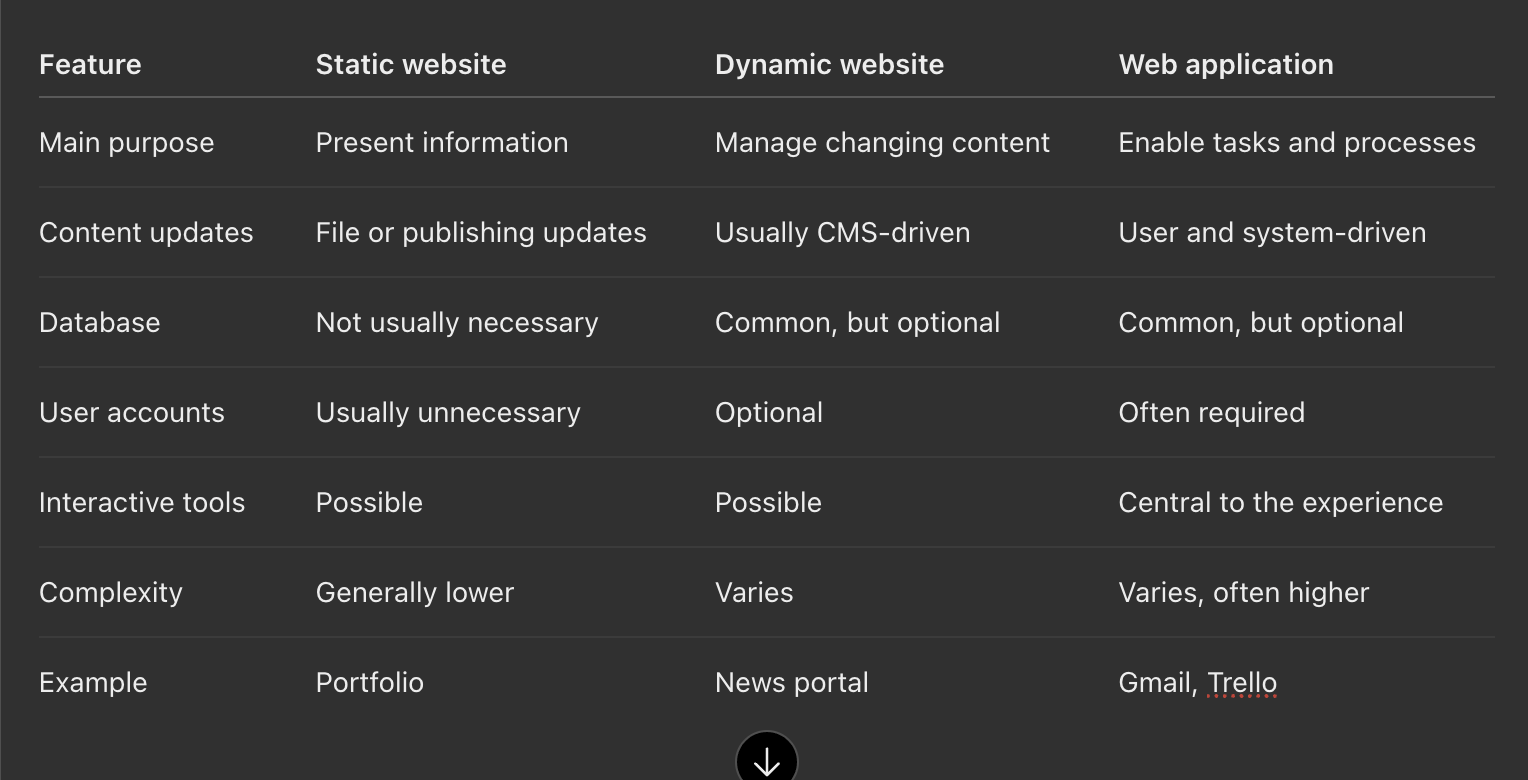
A website can contain elements from more than one category. In fact, this is increasingly common.
A business might maintain a simple public website, add an interactive calculator and later introduce a customer portal.
It does not need to develop everything at once.
7. Why a Website Should Do More Than Display Information
A website can be a digital business card, but it can also be something more valuable: a tool that helps people make decisions.
Imagine someone planning a long-distance journey from Kampala to Gulu. They want to understand the likely fuel cost before beginning the trip.
A vehicle tracking company's website might explain fuel monitoring technology, list its products and provide a telephone number.
That information has value, but it does not immediately answer the visitor's question.
Now imagine the same website allows visitors to enter the distance, estimated fuel consumption and price per litre to calculate an approximate journey cost.
The website has moved from describing a service to solving part of the visitor's problem.
This creates an opportunity for a different relationship with prospective customers. Instead of asking people to trust a business based entirely on promotional claims, the organization demonstrates usefulness.
That usefulness can encourage visitors to explore related services, recommend the resource to others or return when they need further assistance.
The principle is especially relevant to organic search, where people often arrive with a specific question rather than an immediate intention to purchase.
8. How Interactive Tools Can Attract Organic Traffic and Create Business Value
Some of the most useful website features are not large, complicated applications. They are focused tools designed around an identifiable problem.
The following examples demonstrate how different businesses can use practical functionality to provide value while creating opportunities for search visibility.
Example 1: Currency converters — meeting a recurring information need
Consider currency conversion websites such as Xe and Wise.
People regularly need to convert money between currencies when planning travel, evaluating international purchases, preparing budgets or comparing cross-border payments.
A visitor might search for "USD to UGX converter" because they need a practical answer.
A properly designed currency converter can satisfy that need directly. The user enters an amount, chooses the currencies and receives an estimated conversion using an identified exchange-rate source.
These tools demonstrate a useful commercial model: provide a valuable function that naturally relates to the business's wider services.
However, creating a converter does not automatically guarantee rankings. Established financial websites already compete for many currency-related searches, so a new tool would need a meaningful advantage, such as a specialized audience or industry-specific calculations.
Currency tools also require reliable rates, timestamps and clear explanations of whether displayed rates are indicative mid-market rates or actual transaction rates.
Example 2: Proxima Solutions Limited — a fuel cost calculator
Proxima Solutions Limited's Fuel Cost Calculator demonstrates how a specialized business can help visitors understand an everyday expense.
The free calculator is designed around travel in Uganda. Visitors can enter journey distance, fuel price and vehicle consumption, with examples of common Ugandan routes.
The tool also introduces factors affecting real-world fuel costs, including terrain, traffic and driving conditions.
Why is this relevant to Proxima's business?
A prospective customer who wants to estimate a journey's fuel cost may eventually face a broader question: how can an organization monitor and manage fuel consumption across several vehicles?
The calculator addresses the immediate need, while Proxima's wider fuel monitoring services address a more substantial operational challenge.
The value is in the progression from estimating an expense to understanding why monitoring actual consumption might matter.
For organic discovery, the calculator gives the website a relevant resource for people researching fuel costs and journey planning. Whether it produces substantial search traffic depends on indexing, search demand, competition and the usefulness of the experience.
Example 3: Mietric — a trip budget calculator for organizations
Mietric's Trip Budget Calculator provides another example, this time focused on organizational planning.
Nonprofits, development organizations and field teams frequently organize activities involving transportation, accommodation, allowances and other logistical expenses.
Preparing these budgets can involve multiple line items, participants, quantities, timeframes and currencies.
Rather than requiring someone to register for an enterprise resource planning system before calculating a budget, Mietric provides a free browser-based calculator.
Visitors can estimate activity costs, configure line items and export results as CSV or PDF. The tool also offers a pathway to save the budget within the wider Mietric platform.
This is an important distinction.
The public calculator solves a focused planning problem without requiring an account. The broader web application supports more comprehensive organizational processes such as grant management, finance, procurement and operational reporting.
The calculator introduces the value of structured budgeting before asking someone to consider a complete business management platform.
For an organization evaluating software, this type of practical demonstration can communicate capability more effectively than a long list of features.
Example 4: Binomugisha.org — a picture frame visualiser
The Picture Frames & Wall Visualizer on Binomugisha.org demonstrates a different approach.
One challenge when purchasing a picture frame is imagining how it will look in a room.
A customer can examine photographs of available frames, but those images may not resolve questions about size, colour, arrangement or how a frame will complement an existing interior.
The visualiser addresses this uncertainty by allowing visitors to experiment with frame styles, sizes, arrangements and room settings. They can also upload images for preview, review estimated pricing and proceed to an inquiry through WhatsApp.
The website describes its image-preview processing as taking place within the visitor's browser rather than uploading personal images to its servers.
The experience connects three stages of a purchasing decision: imagining the finished product, configuring preferences and contacting the supplier.
This does not require the customer to create an account or access a large enterprise platform.
The broader lesson is that interactive visualisation can help customers understand a product before committing to a purchase.
Similar thinking could apply to furniture retailers, interior designers, fashion businesses, event decorators or other organizations where visualization is an important part of the buying decision.
What these four examples have in common
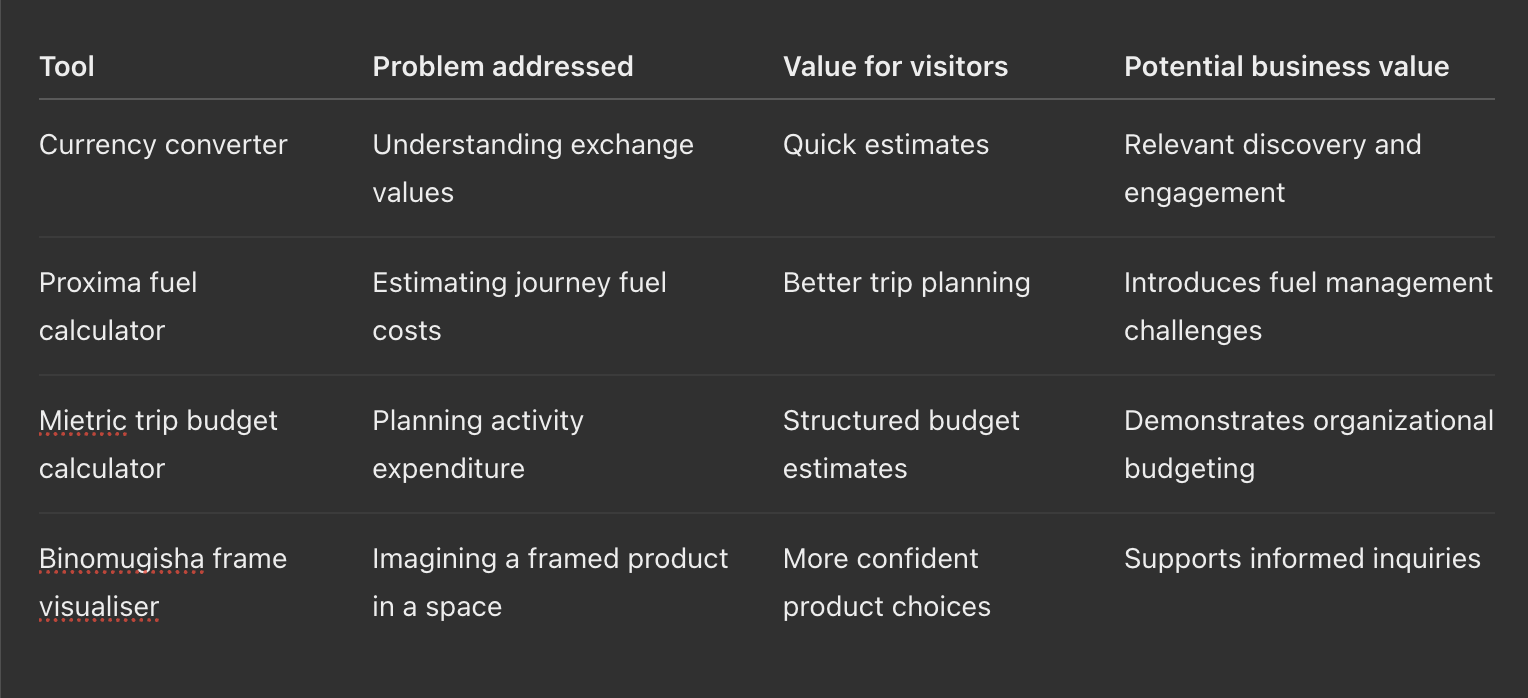
The tools are different, but the underlying approach is similar.
A visitor arrives with a question or an uncertainty. The website provides a useful answer or experience, and the visitor gains a better understanding of the problem and possible solutions.
That is a stronger foundation for trust than merely placing a promotional message in front of someone.
9. Does Adding a Calculator Guarantee Organic Traffic?
No. This is an important distinction because businesses can spend money developing attractive tools that nobody discovers or uses.
A calculator becomes a potential source of organic traffic when it answers a question people are actively searching for, provides a useful experience and can be discovered and understood by search engines.
For example, a fuel calculator targeting Ugandan journeys may be more relevant to local visitors than a generic calculator that assumes international fuel prices and driving conditions.
However, relevance does not automatically translate into rankings. Search engines also consider competing content, page quality, technical accessibility and many other signals.
There is another important technical consideration. A calculator may produce useful results through JavaScript, but search engines do not necessarily interact with it like a human visitor.
Therefore, a calculator page should also contain readable information explaining its purpose, the inputs it uses, how calculations work, its limitations and who might benefit.
Consider a trip budget calculator. Beyond the interactive form, the page could explain what to include in a field activity budget, how per diem is estimated and common expenses organizations overlook.
That supporting content creates additional value for readers and helps search engines understand what the resource provides.
Google's guidance on helpful content explicitly recognizes interactive features, including calculators, as potential main content of a webpage.
The opportunity is not simply to build a tool and hope traffic follows. It is to combine a useful tool with strong content, accurate technical implementation and an understanding of search demand.
10. Ten Practical Ways to Attract Organic Traffic to Your Website
Organic traffic refers to visitors who discover a website through unpaid channels, especially search engines.
For businesses and organizations, attracting this traffic can reduce dependence on advertising and create opportunities for people to discover services while researching problems.
However, sustainable organic visibility requires more than inserting keywords into webpages. It involves creating genuinely useful resources and ensuring they are accessible.
1. Understand what your audience searches for
Before publishing content, research the questions prospective customers ask.
A business offering picture framing services in Kampala might investigate phrases such as "custom picture frames in Kampala," "how much does picture framing cost?" or "best frame size for certificates."
These are possible search queries, not verified search-volume findings.
Tools such as Google Search Console and Google Trends can help identify relevant demand and emerging interests.
The objective is to understand the problem behind a search and create content that addresses it.
2. Create useful tools people have a reason to visit
Calculators, visualisers, planning templates, checklists and comparison tools can give visitors a practical reason to use a website.
A construction company might offer a materials estimator, while an event management business could provide a venue capacity calculator.
The most effective choice is not necessarily the most sophisticated tool. It is the one that addresses a genuine need among the organization's intended audience.
Validate that need before investing heavily in development.
3. Publish educational articles that solve problems
A blog can strengthen discoverability when its articles answer meaningful questions.
A technology consultancy might explain backend infrastructure, cloud hosting costs or the difference between static websites and web applications.
A health service provider might publish carefully reviewed information about preparing for home care, while a logistics company could explain route planning and fuel efficiency.
The goal should be to help readers make informed decisions, rather than publish large quantities of articles simply to attract search engines.
4. Build individual pages for important services
A homepage should introduce the business, but it does not necessarily need to explain every service in detail.
Organizations offering distinct services can create dedicated pages that address each service's benefits, limitations, frequently asked questions and practical considerations.
This can improve navigation for visitors and help search engines identify which pages are relevant to particular queries.
Avoid creating nearly identical pages merely to target slight variations of keywords.
5. Optimize your website for mobile devices and speed
A website that performs well on a desktop computer but becomes difficult to use on a smartphone can discourage prospective customers.
Use responsive design, appropriately sized images, clear navigation and efficient scripts.
Google's Core Web Vitals provide measurements for loading performance, responsiveness and visual stability.
A fast website is not guaranteed to rank highly, but good performance supports a better user experience.
6. Make your content easy for search engines to discover
Configure Google Search Console, submit an XML sitemap and review whether important public pages are eligible for indexing.
Check for broken links, incorrect redirects, accidental blocking rules and duplicate URLs.
It is particularly important to review these issues when redesigning a website or moving content to a new platform.
A sitemap supports discovery but does not guarantee indexing or a particular search ranking.
7. Use meaningful titles, headings and internal links
A page title should clearly explain what visitors will find, while headings should organize information logically.
For example, an article introducing web applications can link naturally to resources about databases, APIs and backend infrastructure.
Internal links help readers explore related topics and provide search engines with useful information about the website's content structure.
Avoid stuffing headings with repeated keywords or creating misleading titles purely to attract clicks.
8. Create helpful images and videos
Original photographs, product demonstrations, explanatory graphics and educational videos can support discoverability while helping visitors understand complex ideas.
Use descriptive alternative text where appropriate, provide captions or transcripts for relevant video content and optimize large media files for efficient loading.
A furniture retailer might demonstrate different arrangements of a product, while an engineering business could explain how a system operates.
The objective is to communicate information that text alone may not explain effectively.
9. Improve visibility in search engines and AI-generated answers
Search Engine Optimization (SEO), Answer Engine Optimization (AEO) and Generative Engine Optimization (GEO) are often discussed as separate strategies, but they share important foundations.
Useful content should be accurate, clearly structured, accessible and supported by trustworthy information.
Define important concepts, answer relevant questions directly, identify sources and use appropriate structured data where it accurately describes the page.
For example, Article, Organization and BreadcrumbList structured data can help describe suitable content to search engines.
However, structured data does not guarantee rankings, rich search results or citations in AI-generated answers.
Google's May 2026 guidance on generative AI search reinforces the importance of established SEO practices and distinctive, useful content.
The long-term opportunity is to become a reliable source of information that people and digital discovery systems can understand.
10. Build credibility and measure meaningful results
A website's visibility can benefit from a credible presence beyond its own pages.
Businesses serving specific locations should maintain accurate business profiles, contact information and genuine customer reviews.
Organizations can also build credibility through partnerships, original research, case studies, community engagement and relevant editorial references.
Use analytics to understand which pages visitors discover, how people interact with your resources and which interactions lead to meaningful outcomes.
Importantly, website traffic and business value are not the same thing.
A thousand visitors who have no interest in your services may be less valuable than fifty visitors who arrive with a relevant problem and find a useful solution.
Measure the outcomes that matter, not just visitor numbers.
11. How Much Does It Cost to Develop a Static Website in Uganda?
One of the most common questions businesses ask is how much website development costs.
There is no universal price because development requirements differ significantly. A simple landing page using an established template is not equivalent to a customized business website with original design, professional content and specialized functionality.
Published Ugandan web development prices in 2026 suggest the following illustrative planning ranges.

These are broad planning estimates based on publicly advertised market prices, not standardized industry rates.
They should not be interpreted as a quotation or guarantee of what a particular project will cost.
A static website typically becomes more expensive when it requires original design, professional copywriting, photography, multilingual content, detailed accessibility work, integrations or custom interactive functionality.
Development cost versus operating cost
The initial development fee is only one part of ownership.
Organizations should also budget for domain registration and renewal, hosting, ongoing updates, security requirements, backups and technical support where applicable.
Static websites may qualify for low-cost or free-tier hosting, depending on traffic, provider terms and technical requirements.
However, even a simple website still needs someone responsible for maintaining accurate information, renewing the domain and ensuring important links and forms continue to work.
What should you confirm before paying for development?
Before approving a quotation, establish who owns the domain, website content and source code.
Clarify whether the website includes mobile optimization, basic SEO configuration, analytics, SSL/TLS, testing and deployment.
It is equally important to understand what happens after launch. Can the organization update content without hiring the developer? Will future changes attract additional charges? Can the website move to another hosting provider?
A lower initial price may not represent better value if the organization becomes dependent on expensive ongoing modifications.
The better approach is to assess the total cost of ownership against the website's intended purpose.
12. When Should a Business Move From a Static Website to a Dynamic Website?
Growth alone does not automatically require a more complex website.
A successful consultancy with stable services may continue using a static website for years. If it communicates information effectively and visitors can reach the business, a redesign may provide limited additional value.
The need for dynamic functionality becomes clearer when maintaining content manually creates unnecessary work.
Consider a nonprofit organization publishing research, project updates, impact stories, vacancies and downloadable reports throughout the year.
If several employees need to contribute content, a CMS can provide structured publishing workflows, editorial permissions and easier updates.
Similarly, a business maintaining a catalogue of hundreds of products may benefit from database-driven content management rather than editing individual pages.
In both cases, the justification is operational efficiency.
Choose dynamic content management when the volume, frequency or complexity of updates makes manual maintenance inefficient.
A CMS-enabled website can still produce fast, search-friendly static pages for visitors, so adding editorial capability does not require abandoning the benefits of static delivery.
13. When Should an Organization Invest in a Web Application?
A web application becomes particularly valuable when an organization needs its digital platform to manage activities rather than simply communicate information.
Imagine a healthcare service provider that initially establishes a website introducing available services.
As the organization grows, it begins coordinating client assessments, caregiver assignments, appointments, contracts, invoices, payments and service reports.
Managing these processes through spreadsheets, emails and messaging applications can become increasingly difficult.
Information may be duplicated across systems, employees may struggle to identify the latest records and managers may have limited visibility into ongoing activities.
At this stage, an integrated web application could help the organization coordinate workflows, maintain records, define permissions and improve accountability.
However, investing in custom development is not always the best solution.
Existing software products may already provide suitable functionality, sometimes at considerably lower cost and implementation risk.
An organization should therefore examine whether it needs custom development, a configurable software platform or simply improvements to its current processes.
Five questions to ask before investing
- What specific problem must the website or application solve?
- Who will use it, and what actions must they perform?
- Does the solution need to store sensitive information or enforce different user permissions?
- Could existing software or a simple interactive tool meet the requirement?
- What measurable benefit justifies development, hosting, security and maintenance costs?
The answers help establish whether additional technical complexity is justified.
14. How Web Development Has Evolved
The history of web development demonstrates how technology has gradually expanded what organizations can accomplish online.
The early web: Publishing information
The early World Wide Web focused heavily on publishing and accessing information through interconnected pages.
Organizations could make information available beyond printed publications and physical offices.
The primary opportunity was reach: people could discover information remotely through an internet connection.
The interactive web: Participation and collaboration
As browser technologies and internet infrastructure improved, websites began supporting greater interactivity.
Social networks, online communities, collaborative encyclopedias and video-sharing platforms demonstrated that users could contribute content instead of simply consuming it.
This significantly changed how information was produced, distributed and discussed.
The application-driven web: Digital operations
Cloud computing, APIs, modern JavaScript frameworks and increasingly accessible backend platforms enabled businesses to build sophisticated browser-based software.
Organizations could now manage financial records, projects, customer relationships and daily operations through systems accessed online.
The website evolved from an information channel into a working environment.
The AI-assisted web: Accelerating parts of development
Artificial intelligence is influencing another transition.
AI-assisted development tools can help programmers write code, generate tests, explain unfamiliar systems, troubleshoot errors, develop prototypes and document software.
For small organizations, these capabilities can make it easier to explore concepts that previously required considerable manual development effort.
For experienced developers, AI can assist with routine tasks and support experimentation.
However, the effectiveness of AI depends on the task, the quality of the instructions, the surrounding software architecture and the quality of human review.
Research findings are not universally positive. In February 2026, developer productivity research organization METR explained that its newer experiment could not reliably establish the overall productivity effect of AI tools because of selection and measurement limitations.
This highlights an important distinction: generating code faster does not necessarily mean delivering reliable software faster.
Production applications still require testing, security reviews, accessibility, data protection, monitoring and long-term maintenance.
AI may reduce the effort involved in writing some code, but it does not eliminate the responsibility to build systems that work correctly.
15. What Could Artificial General Intelligence Mean for Web Development?
Artificial General Intelligence, commonly called AGI, refers to the ambition of developing AI systems with capabilities that extend across a very broad range of intellectual tasks.
Definitions vary. OpenAI's charter, for example, describes AGI in terms of highly autonomous systems outperforming humans at most economically valuable work.
There is no universally accepted test or confirmed date for AGI, and predictions about its arrival remain uncertain.
Nevertheless, the possibility of increasingly capable AI raises interesting questions about the future of websites and software development.
From writing code to defining outcomes
Consider a business owner explaining that the organization needs a system to receive customer inquiries, schedule appointments, manage invoices and generate reports.
Future AI systems may become better at translating these requirements into software, identifying missing specifications, testing integrations and recommending improvements.
The development process could become increasingly conversational.
However, defining a useful system involves more than describing features. It requires understanding people, business processes, legal responsibilities, costs and operational risks.
The possibility of lower development barriers
As AI tools improve, some categories of software may become less expensive to prototype and develop.
Organizations with smaller budgets could gain greater access to digital tools.
Yet reducing coding effort does not automatically eliminate infrastructure, maintenance, data security or compliance expenses.
A sophisticated application may still require databases, backups, authentication systems, access controls and reliable hosting.
Why human judgment may become more valuable
As technology becomes more capable, the ability to identify the right problem can become an important competitive advantage.
An organization could build an impressive application that nobody needs. It could also develop a relatively simple calculator that solves a recurring customer problem.
The difference is not the amount of code written.
It is the quality of the thinking behind the investment.
If future AI systems become increasingly autonomous, governance will become even more important. Organizations will need clarity on what automated systems may access, what decisions they can make and when human approval is necessary.
The future of web development is therefore not simply about making software easier to generate. It is also about ensuring that software remains useful, trustworthy and accountable.
16. What Does All This Mean for a Business Considering Its First Website?
A business does not necessarily need the most advanced website to benefit from being online.
Its first investment might be a well-designed static website with accurate information, clear service descriptions and reliable contact channels.
As the organization learns more about customer needs, it can identify opportunities to provide additional value.
A logistics company may discover that visitors frequently ask about fuel costs. A property business may find that customers struggle to estimate rental yields. A construction firm may receive repeated questions about quantities of materials required for small projects.
Each recurring question presents an opportunity to build a useful resource.
That resource might be an article, calculator, downloadable template, interactive visualisation or decision guide.
If the business eventually needs to manage customer accounts, transactions or operations, it can evaluate whether a web application is justified.
This approach encourages organizations to build incrementally, based on evidence rather than assumptions.
A practical way to think about digital investment
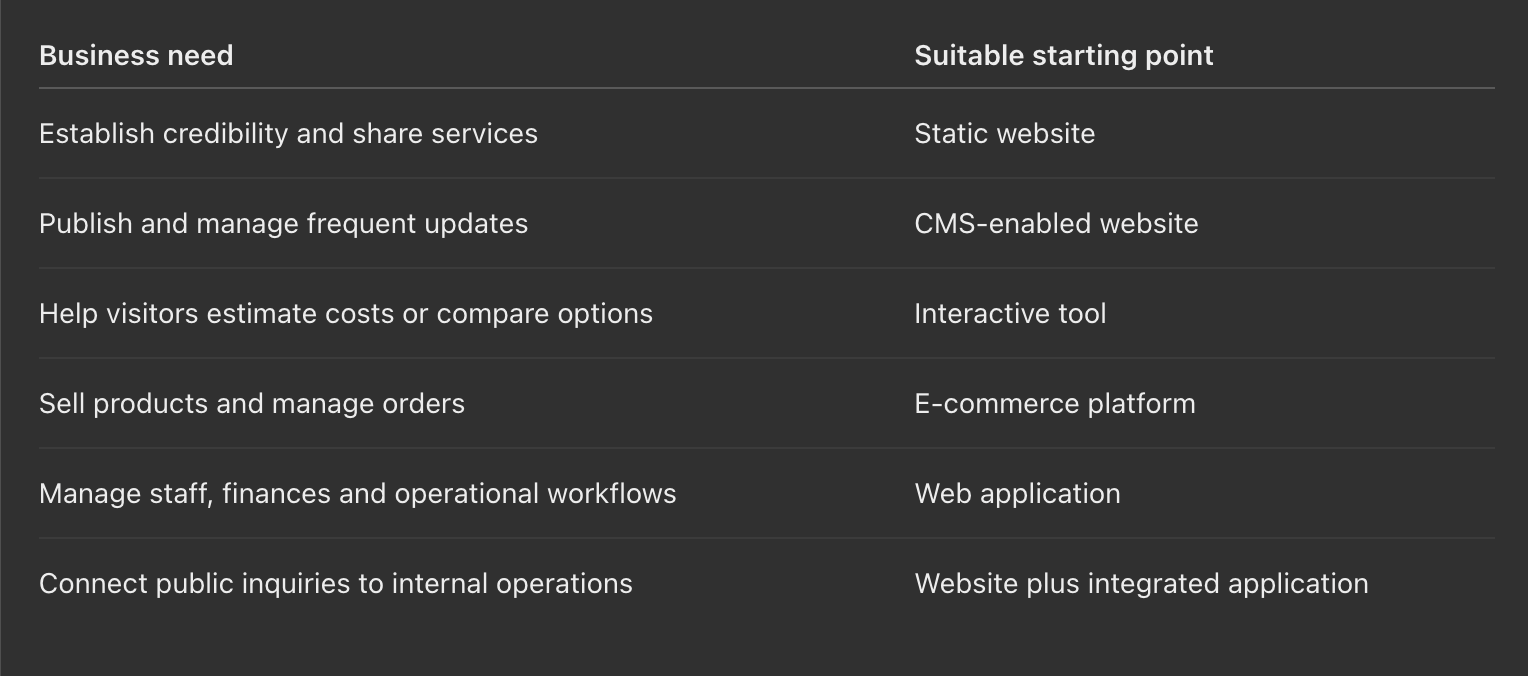
The right architecture can evolve as the organization's needs change.
Conclusion: A Website Is an Investment in Solving Problems
Web development has evolved from publishing simple online pages to building powerful applications that support businesses, institutions and individuals around the world.
The emergence of AI is accelerating parts of that evolution, making new capabilities more accessible while introducing fresh questions about quality, accountability and long-term value.
Yet one principle remains unchanged: technology is most useful when it solves a meaningful problem.
A static website can establish credibility and make an organization easier to discover. A dynamic website can help teams publish and manage content efficiently. A web application can coordinate operations, process information and support complex business activities.
And sometimes, a relatively simple calculator or visualiser can provide more immediate value to a prospective customer than an expensive platform filled with features they do not need.
The examples of Proxima Solutions Limited, Mietric and Binomugisha.org demonstrate a useful principle: a business can offer something practical before asking a visitor to become a customer.
That approach does not guarantee organic traffic, inquiries or sales. But when supported by relevant content, sound technical implementation and an understanding of the audience, it can create a more meaningful digital experience.
Before developing or redesigning a website, organizations should consider what their visitors are trying to accomplish, what prevents them from making decisions and where a digital solution could genuinely help.
The most important question is not, "How advanced should our website be?"
It is, "What problem should our website solve, and how can we make that solution useful enough for people to return?"
That is where digital value begins.
References and Further Reading
- MDN Web Docs — Introduction to Server-Side Programming
- Google Search Central — SEO Starter Guide
- Google Search Central — Creating Helpful, Reliable, People-First Content
- Google Search Central — Optimizing for Generative AI in Search, May 2026
- METR — Developer Productivity Experiment Update, February 2026
- OpenAI Charter — Artificial General Intelligence
- TFast Digital — Website Pricing in Uganda, 2026
- Omega Nodes — Website Development Costs in Uganda, 2026
- Proxima Solutions Limited — Fuel Cost Calculator
- Mietric — Trip Budget Calculator
- Binomugisha.org — Picture Frames & Wall Visualizer
The development cost estimates are illustrative ranges drawn from advertised Ugandan market pricing in 2026. They are not fixed industry rates. Examples of websites and web applications reflect publicly documented functionality; their internal architectures may differ from the conceptual categories discussed.